
Why Blockers Get Switched Off — and How Graduated Friction Helps
Website blockers are easy to switch off. See the evidence for small friction, a five-rung ladder matched to each site, and a two-week rollout plan.
Ask this guide
Answers come straight from this guide’s text. Nothing is generated, and nothing you type leaves your browser.
A familiar pattern: on day one you block every distracting site. On day three you need one of them for a legitimate reason, so you switch the blocker off "just for a minute". By day five it may still be off. We found no study that measures how often this happens, so treat it as a common experience, not a statistic.
The usual diagnosis is weak willpower. Habit research frames it differently: Wood and Rünger's review describes habits as responses triggered automatically by recurring cues, and a block on one site does not remove the cue. Small, well-placed friction (a pause, a typed reason, a time limit) has some support in the studies below, though none compares it head to head with a hard block, and you can build it from tools you already own.
By the end you will be able to sort your sites onto a five-rung friction ladder, set it up with Screen Time, Digital Wellbeing or an extension, and run a two-week trial that shows whether it works.
Why hard blocks get switched off
Almost every distracting site has a legitimate use
YouTube hosts tutorials, Reddit holds the answer to your obscure error message, and feeds carry industry news. The first real need forces you to disable the block, and re-enabling it is one more chore when you would rather not. In an Oxford study of Facebook interventions (covered below), a student who used the site just to message people found the goal prompt "extremely annoying".
The cue survives the block
Wendy Wood and Dennis Rünger's 2016 review of habit research describes habits as context-response associations built by repetition. Difficulty changing them, they write, does not reflect "a failure of willpower"; old habits keep being "activated automatically by recurring environmental cues".
A block removes one destination. The cue stays (a finished task, a dull minute, a fresh tab) and may reach for the next-closest site. The same review notes that when distraction, time pressure, lowered willpower or stress limit our capacity to deliberate, habits supply a ready response, so that is when friction has to carry more of the load.
Reactance is a plausible third problem
Jack Brehm's 1966 theory of psychological reactance holds that a threat to, or loss of, a free behaviour produces what Steindl and colleagues' 2015 review calls "an unpleasant motivational arousal", and one response they list is making the restricted option more attractive. That review does not test restrictions you set on yourself, and we found no study of reactance toward website blockers, so treat it as a plausible reason a total ban can feel like a fight, not a proven cause.
What small friction has achieved in studies
| Study | What happened | Caveats |
|---|---|---|
| Grüning et al., PNAS 2023 (iOS app one sec) | 280 of 719 volunteers finished six weeks with a 10-second delay, message and dismiss option. Attempts to open target apps fell 37%; users backed out of 36% of attempts | No field control group; the developer is a co-author |
| Lyngs et al., CHI 2020 (Facebook) | 58 students (47 with logging data). Typed-goal reminders cut daily time and visits; removing the newsfeed shortened visits | Exploratory, uncorrected p-values; laptops only; reminders often annoying |
| Allcott, Gentzkow & Song, NBER 2022 (published in AER) | About 2,000 US Android users, 12 weeks. Optional app limits cut use of six apps by 22 min/day (16%) | Self-selected, pandemic period; most limits could not be overridden at once |
| Kovacs, Wu & Bernstein, HabitLab slides 2018 | 217 people, Chrome extension. Rotating interventions cut modelled daily time from about 146 to 96 seconds per site | Model estimates; fewer kept it installed after a week (52% vs 74%) |
Allcott's snooze delays (0 to 20 minutes, or none) were assigned at random but pooled, so that paper says nothing about the best delay.
One sec's authors report a 57% drop in actual openings after six weeks. That appears to compare week 6 with week 1: about 105 attempts, roughly a third dismissed, leaves about 71 openings against 166. It is a within-user trend among volunteers who stayed, and multiplying the two headline figures (36% dismissed on average, 37% fewer attempts) gives about 60%, so we quote the components. Together these studies show friction can work for motivated volunteers, not how much it will work for you.
Four design rules the evidence suggests
- Give the pause a clean exit. In one sec's online experiment (500 people, viral video clips), the option to skip before playback did most of the work. The delay added nothing on top of it, the message alone did nothing, and the full combination did not beat the option, which the authors tie to possible cognitive overload. A pause with no "never mind" button is a wait; with one, it is a decision.
- Make the intention specific. One sec's generic message had no measurable effect, and its authors suspect it was too general. Lyngs's prompt had students type why they opened Facebook and reminded them minutes later; daily time and visits fell, though some said annoyance drove that. No study compares specific and generic intentions, but "find the docker-compose error thread" gives you something to check against and "stay focused" does not.
- Scale annoyance to legitimate use. The goal prompt irritated people who came to message friends. Reserve heavy friction for sites where legitimate use is rare.
- Expect drift. In one sec, the share of attempts dismissed fell from 43% in week 1 to about a third from week 3 on, even as attempts themselves fell. A plausible reading is that the most pointless openings vanish first and a harder core remains. HabitLab's slides show modelled time on target sites rising across the first three days of one static intervention, so review your setup instead of setting it once.
A five-rung friction ladder you can build with any tool
Before climbing, remove the cue where you can: log out, take the icon off the dock or home screen, and mute notifications (the 30-minute notification audit walks through it). What remains goes on the ladder.
| Rung | What happens | Suits |
|---|---|---|
| 1. Pause with exit | Full-screen wait of about 10 seconds with a visible "never mind" | Errands, low-risk sites |
| 2. Typed intention | To continue, you type what you came to do | Mixed-use sites: video, forums, news |
| 3. Timed allowance | Continuing grants a fixed window, say 10 minutes, then the prompt returns | Open-ended sessions on mixed-use sites |
| 4. Effort gate | A puzzle or longer wait before you can pass | Late hours, low-energy windows |
| 5. Scheduled lock | Bypass disabled during a window you set in advance | Sites with no legitimate use in your job |
Rung 1 is an analogy to what Wood and Rünger report as the most successful spontaneous strategy against unwanted habits: thinking "don't do it" and being mindful of slip-ups. That worked by enhancing cognitive control, not weakening the habit, and nobody has tested a timed screen as a stand-in. Rungs 1 and 2 are design choices informed by one sec and Lyngs, and we know of no study isolating the typed reason or rung 4's puzzle gates.
Rung 5 is a hard block, and that is fine for the right sites. The failure is the all-day, all-sites version set in a burst of enthusiasm. In the Allcott experiment people were not paid to set limits, yet 78% of the limit group still held limits in the final weeks that would have cut their baseline use. The authors hypothesise that without their survey walk-through the effects would have been smaller, and most limits could be snoozed only after a delay or not at all, so this supports limits you choose yourself, not hard blocks as such.
Which rung for which site
Ask two questions of each site: do I need it for my job, and does a visit end on its own?
| Site type | Needed for work | Visit ends itself | Start at |
|---|---|---|---|
| Errands: shopping, banking, travel | Occasionally | Yes | Rung 1 |
| Mixed-use: YouTube, Reddit, news | Weekly | No | Rung 2, add 3 |
| Feeds and short video | Never | No, by design | Rung 3 on breaks, 5 in work blocks |
| Email and chat | Daily | Partly | No friction; fix notifications |
| The site you cannot resist | Any | No | Rung 4 or 5 |
Re-sort sites weekly with the decision rule in the trial below.
Setting it up with built-in tools
Built-in tools mostly cover rungs 3 and 5. The Apple and Google guides cited here describe timers and schedules, not a prompt asking why you are opening something, so rungs 1 and 2 need an extension or a manual habit (end of this section). Steps differ by OS version.
Mac on macOS 26 Tahoe
- Open System Settings, click Screen Time, then App Limits (turn it on if off) and Add Limit.
- Check an app, category or website (expand Websites at the bottom, or click Add Website and enter the URL).
- Set the time to Every Day, or Custom to edit each day.
- Check "Block at end of limit" only for sites that belong on rung 5. Apple's page does not say what happens when it is unticked or which browsers website limits cover; run the test below.
iPhone on iOS 26
Go to Settings, Screen Time, App Limits, Add Limit, pick categories or apps, tap Next and set the time. Apple notes that by default "Screen Time limits can be ignored once reached", so out of the box this is rung 3. Apple points to Block at Downtime as the way to stop limits being ignored: with a Screen Time passcode set, turn it on under Downtime and restricted apps can't be opened during downtime (off, you get a reminder but can continue). That is your closest match for rung 5.
Warning: If you lock Screen Time with a passcode so you cannot undo your own limits, decide in advance who holds it and how you will recover it. The Apple pages cited here do not cover recovery; read Apple's passcode guide first.
Mac and iPhone on version 27
Apple's guides now have a version 27 edition built around Screen Time Schedules and category Time Allowances. On macOS 27: System Settings, Screen Time, turn on Schedule, then Time Allowances, Match Screen Time Schedule and Manage Categories. On iOS 27: Settings, Screen Time, Screen Time Schedule, then Time Allowances. Apple says these need version 27 on all your Apple devices and that an allowance covers an app and any website it declares; the pages describe no limits for individual websites or what happens when an allowance ends, so run the test below.
Android
Open Settings, Digital Wellbeing, App timers, tap Set timer next to an app, pick a limit and tap OK. At the limit the app closes and its icon dims; timers reset at midnight, and deleting the timer lets you back in sooner, a small bypass cost. For one site, tap the chart, then Chrome, then Set site timer next to it; Google does not say what happens at that limit. Focus mode pauses chosen apps, can run on a schedule, and offers "Take a break" to unpause temporarily.
Tip: The day-three failure is an off switch with no timer. Where a tool offers a timed pause, such as Android's Take a break, use it instead of off. Where it only has on and off, as Apple's page describes for Mac App Limits, set a reminder for 30 minutes later: switch it back on.
Test any built-in limit in five minutes
- Set the shortest limit the tool allows on a site you rarely use.
- Open that site in each browser you actually use.
- Note whether time is counted and what you see when the limit hits.
- Note if you can dismiss it or must change a setting.
- Delete the test limit.
Rungs 1, 2 and 4: by hand or with an extension
By hand, no install: before opening the site, write the reason in a note, and close the tab if you cannot name a specific one. It is easy to skip, which is the cost of having no software enforce it.
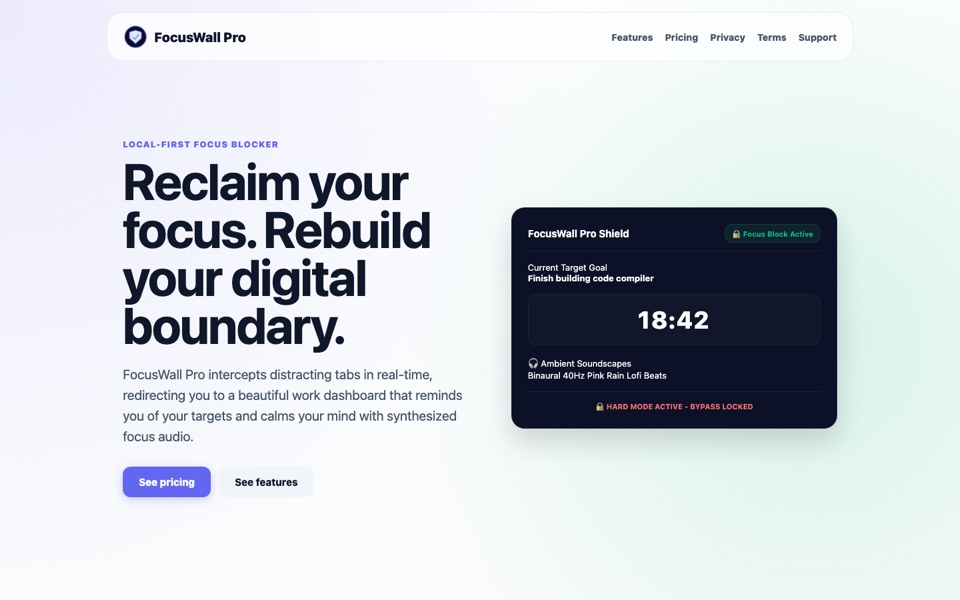
For enforcement, look for an extension with per-site rules, a delay with a visible exit, a typed reason, schedules and a log. FocusWall Pro is a Chrome extension we build along these lines. It redirects a distracting tab to a dashboard showing your current goal, offers five levels (soft confirmation, a 10-second wait, a written justification, a math challenge and a Hard Mode that locks the bypass), and saves the justification you type for a bypass to a private local intention ledger. Its levels are its own design, not a copy of the ladder, and everything here works without it.
Schedules beat permanent rules
Friction should follow your calendar. An all-day rule invites the disable-forever failure; a window you can see ending does not. Wood and Rünger's review notes that inhibition plans work when tied to the cues that trigger the habit ("after dinner"). "Not until 12:00" borrows that idea, though the review's evidence is for plans tied to the habit's own cue, not clock times.
Say a developer's weekday looks like this:
| Window | Feeds, short video | YouTube, Reddit, news |
|---|---|---|
| 09:00 to 12:00, deep work | Rung 5 | Rung 2 |
| 12:00 to 13:00, lunch | Open | Open |
| 13:00 to 17:00 | Rung 3 | Rung 3 |
| After 22:00 | Rung 5 | Rung 4 |
The late row is a judgement call; we found no study on late-night browsing specifically. For why a detour costs more than its length, see attention residue.
Run a two-week trial and measure it
The weekly tally
Blocked-attempt counts alone mislead. Once a week, copy this table and fill it in for each flagged site:
| Site | Rung | Attempts | Turned back | Passed, needed | Passed, regretted |
|---|---|---|---|---|---|
| youtube.com | 2 |
An attempt is any time you went for the site. A pass-through (a "pass") is a visit where you continued past the friction, tagged as needed (you had a real reason) or regretted (you wish you had stopped). Track passes: passes = attempts × (1 − turn-back rate), and passes = needed + regretted.
Say YouTube had 70 attempts and 30 turn-backs in week 1 (43%), then 45 attempts and 15 turn-backs in week 4 (33%). The turn-back rate fell, yet passes dropped from 40 to 30 and attempts fell about 36%. That is progress if regretted passes fell too; if they stayed flat, the friction is only trimming the needed ones.
The decision rule: move a site up one rung when more than half its passes in a week were regretted, and down one when needed passes outnumber regretted ones and you felt annoyed.
We found no verified figure for how long a browsing reflex takes to fade, so judge the trend over several weeks. The only timing evidence we found is for forming habits: Wood and Rünger cite a field study where a simple behaviour took 18 to 254 days to become habitual (see habit-formation timing).
The day-by-day plan
- Day 1: Write down last week's minutes for your five biggest time sinks from your Screen Time or Digital Wellbeing report (your baseline), then remove their cues.
- Day 2: Answer the two questions for each site and assign a starting rung.
- Day 3: Run the five-minute test, then set up rungs 3 and 5 with built-in tools, plus an extension for rungs 1 and 2 if you want one. Decide the one situation in which you will switch friction off, and the timed pause you will use.
- Days 4 to 7: Change nothing. Fill in the tally.
- Day 8: Hold a short review (the weekly review template fits). Move at most two sites one rung. Reopen your top-five list and check whether a new site has climbed.
- Days 9 to 13: Run the adjusted setup and keep tallying.
- Day 14: Per site, keep, tighten or loosen. If every pass was needed, loosen it. Repeat the Day 8 review every two weeks until week 6, then judge the trend.
Where to start this week
Pick three sites, assign each a rung, and set the two cheapest today with a built-in timer. Keep heavy rungs for sites with no use in your job. The target is a gradual fall in regretted passes, not a perfect record of denied requests.
Frequently asked questions
Is a hard block ever the right choice?
Yes, for sites with no legitimate use in your job, inside a window you set in advance. Allcott's volunteers mostly kept limits they chose themselves, so choose the window and the sites yourself and avoid the permanent, all-sites version.
How long should the pause last?
One sec used 10 seconds. Its experiment compared a delay against no delay, not different lengths, and Allcott pooled its snooze delays, so we know of no evidence for an ideal number. Start at 10 seconds and make the exit as obvious as the continue button.
Do I need the same friction on my phone and my laptop?
For the sites that matter, probably. The Facebook study's interventions ran in Chrome on laptops, and use was logged on laptops only. Asked whether the interventions changed how they used Facebook on phone versus laptop, 86% of the goal-reminder group and 57% of the no-newsfeed group said yes, against 6% of controls. We found no study measuring displaced distraction, but an unprotected device is the obvious way around.
What if I need the site for work?
If your tool can match URL paths, put the friction on the parts you do not need (a feed page, say) and leave the pages you need alone. If it cannot, tag those visits as needed and move the site down a rung after a week of mostly needed passes.
Sources and further reading
- Directing smartphone use through the self-nudge app one sec — Grüning, Riedel & Lorenz-Spreen, PNAS, 2023. The one sec field results and the 500-person online experiment.
- Psychology of Habit — Wood & Rünger, Annual Review of Psychology, 2016. Cue-driven habits, inhibition strategies and habit-formation timing.
- Understanding Psychological Reactance: New Developments and Findings — Steindl et al., Zeitschrift für Psychologie, 2015. The definition of reactance and responses to threat.
- 'I Just Want to Hack Myself to Not Get Distracted': Evaluating Design Interventions for Self-Control on Facebook — Lyngs et al., CHI 2020. The Facebook study.
- Digital Addiction — Allcott, Gentzkow & Song, NBER Working Paper 28936, June 2021, revised March 2022; published in American Economic Review 112(7), 2022 (doi 10.1257/aer.20210867). Figures here are from the working-paper revision.
- Rotating Online Behavior Change Interventions Increases Effectiveness But Also Increases Attrition — Kovacs, Wu & Bernstein, Stanford HCI Group, 2018. HabitLab presentation slides; we did not check the CSCW paper itself.
- Apple Support, 2026: Set time limits for apps and websites in Screen Time on Mac and Set schedules with Screen Time on iPhone for macOS 26 and iOS 26; Set Screen Time Schedules and Time Allowances with Screen Time on Mac and on iPhone for version 27.
- Manage how you spend time on your Android phone with Digital Wellbeing — Google, 2026. App timers, site timers in Chrome and Focus mode.